
What Is a Document Management System? DMS Explained
What Is a Document Management System? Features, Benefits, and Uses

Updated: November 11, 2026
A document management system (DMS) is software that helps your organization store, classify, secure, and automate documents, making your information easier to find, manage, and govern while improving team efficiency.
Businesses create and manage vast amounts of documents and information every day. Without a structured way to organize them, files can become difficult to find, outdated versions can circulate, and sensitive information can end up in the wrong hands.
What is a document management system (DMS)?
A document management system (DMS), sometimes called document management software, stores, manages, and tracks electronic documents and digital files. It replaces paper-based processes and unstructured file storage with a consistent way to control how documents are created, stored, accessed, shared, and updated. Metadata, version control, permissions, and workflow automation provide that structure.
How does a document management system work?
Document management software manages documents throughout their lifecycle, from creation and capture through review, approval, retention, and eventual archiving or disposal. Instead of relying on employees to organize files manually, a DMS applies consistent rules for how documents are classified, secured, managed, and governed.
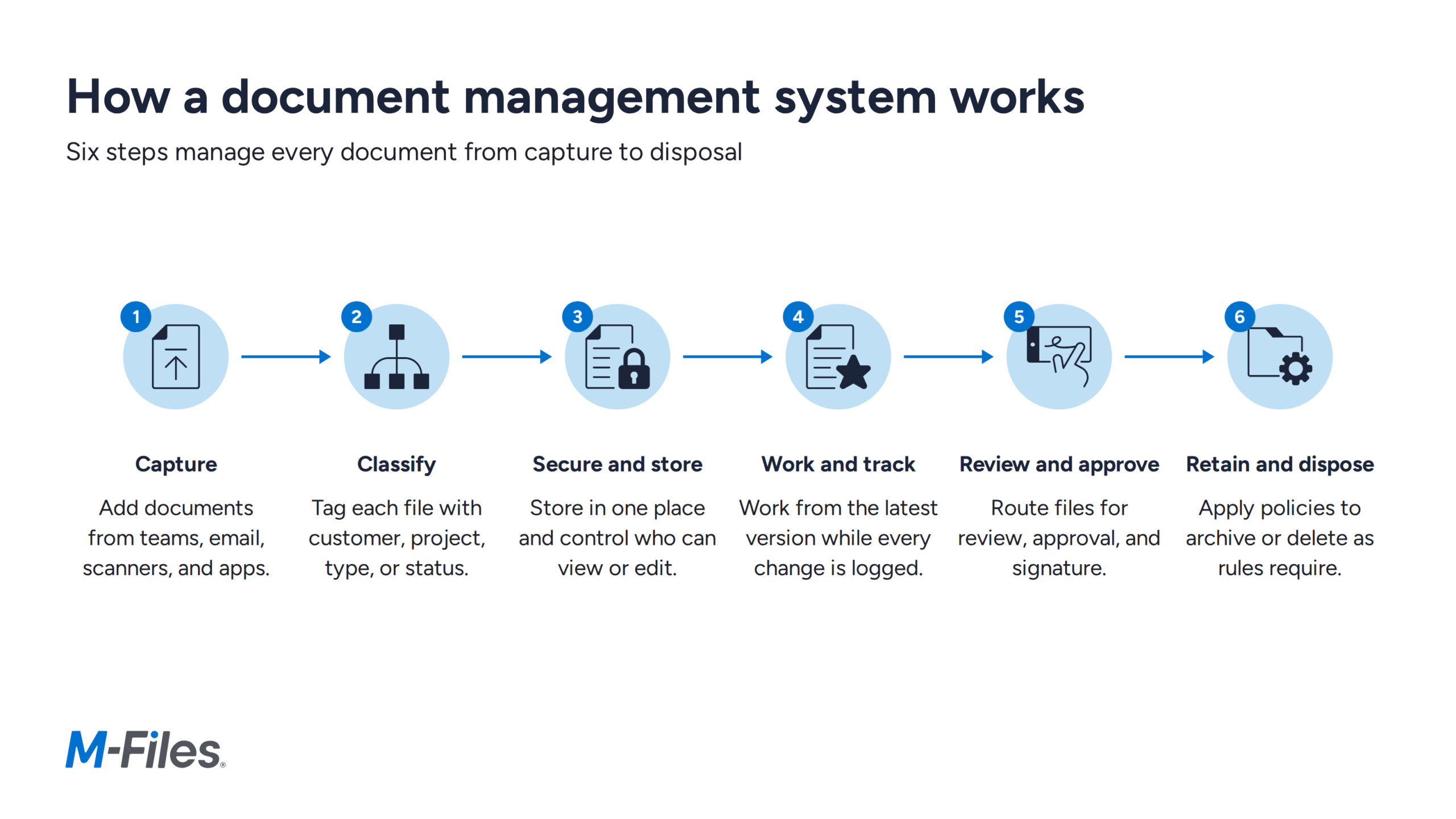
- Capture: Bring in documents your teams create or import from email, scanners, and business applications.
- Classify: Tag each document with metadata such as customer, project, document type, owner, or status.
- Secure and store: Keep documents in one place and set who can view, edit, share, approve, or delete them.
- Work and track: Teams find, edit, and share the latest version while the system records every change.
- Review and approve: Workflows route documents for review, approval, and signature.
- Retain and dispose: Retention policies archive or delete documents as business and compliance rules require.
What are the key features of a document management system?
A modern document management system goes beyond storing files. It gives your organization the tools to organize, find, secure, track, and manage documents throughout their lifecycle.
Key DMS features include:
- Document storage and organization: Centrally manage business documents and organize them using folders, metadata, or other business information.
- Metadata and indexing: Classify documents by information such as customer, project, document type, status, owner, or date, making content easier to organize and retrieve.
- Search and retrieval: Find documents using keywords, full-text search, metadata, filters, and increasingly, AI-powered search.
- Version control: Track changes and maintain document history so your teams can work with the latest version while accessing previous versions when needed.
- Permissions and access controls: Control who can view, edit, share, approve, or delete documents based on roles and business requirements.
- Workflow automation: Automatically route documents through processes such as review, approval, signatures, publication, and archiving.
- Audit trails: Track document activity and changes to improve accountability and support governance and compliance requirements.
- Records and retention management: Apply retention policies and lifecycle controls to help your organization retain, archive, or dispose of documents appropriately.
- Collaboration: Give your teams controlled access to the same information while reducing duplicate files, conflicting versions, and unnecessary email attachments.
- Integration with business applications: Connect documents with the systems and applications your teams already use so information remains accessible within existing business processes.
Explore DMS features in more depth
What are the key benefits of implementing a DMS?
A document management system helps your teams work more efficiently, find the information they need faster, strengthen security, and support governance and compliance.
Here are some of the core DMS benefits:
- Your teams find files faster, even when they don’t know where they’re stored.
- Sensitive documents stay protected because access follows role, document type, or business need.
- Everyone works from the latest version, which prevents mistakes and duplicate work.
- You gain greater control over business information through permissions, governance, and lifecycle management.
- Compliance gets simpler with audit trails and retention policies.
- Work moves faster because workflows route reviews and approvals automatically.
- Costs and errors drop as paper and manual processes fade.
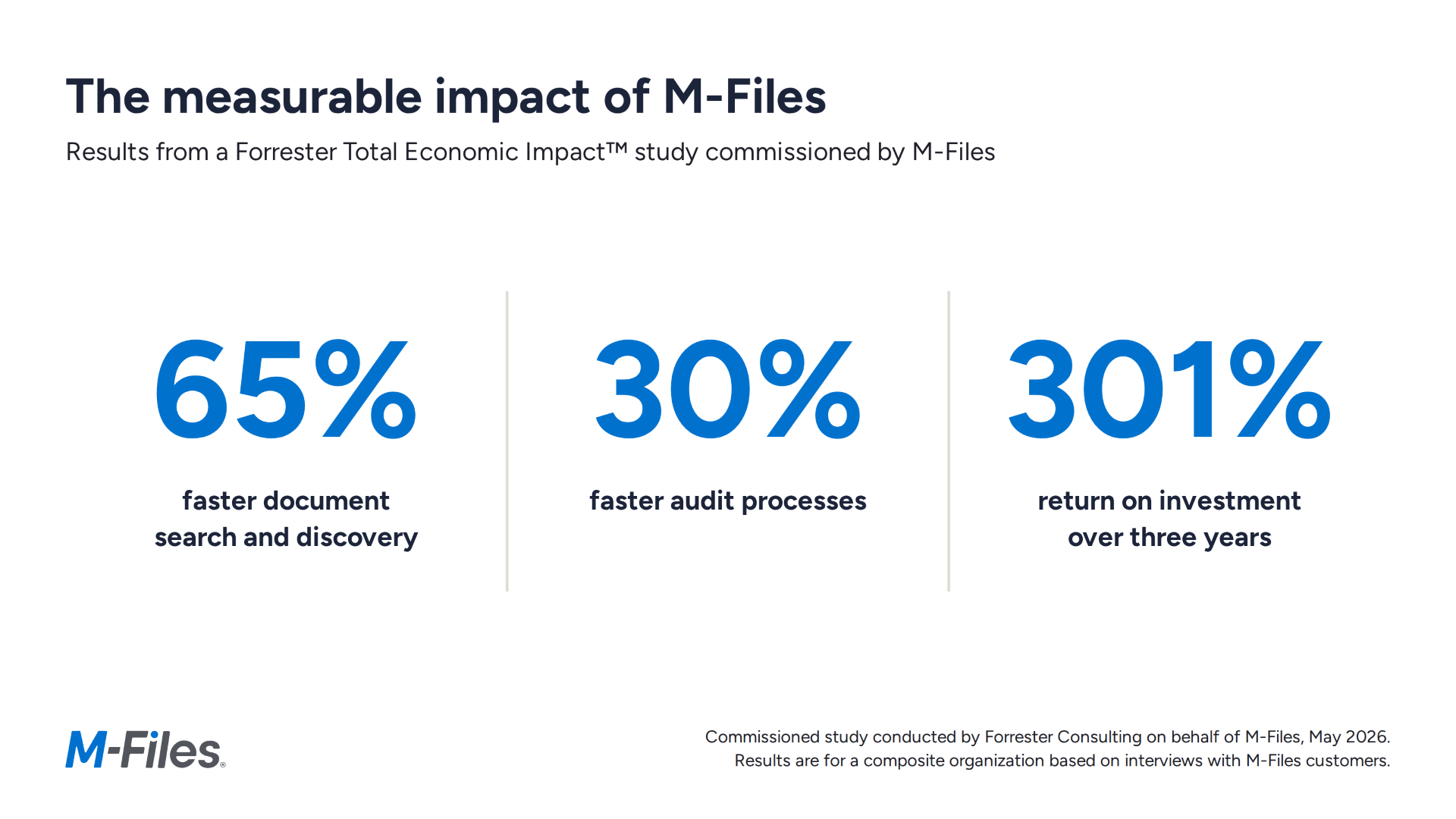
Together, these benefits can produce measurable business value. In a Forrester Total Economic Impact™ study commissioned by M-Files in May 2026, a composite organization based on interviews with M-Files customers achieved 65% faster document search and discovery, 30% faster audit processes, and a 301% return on investment over three years.
Learn more about the return on investment from using a DMS.
How does a DMS differ from traditional file storage methods?
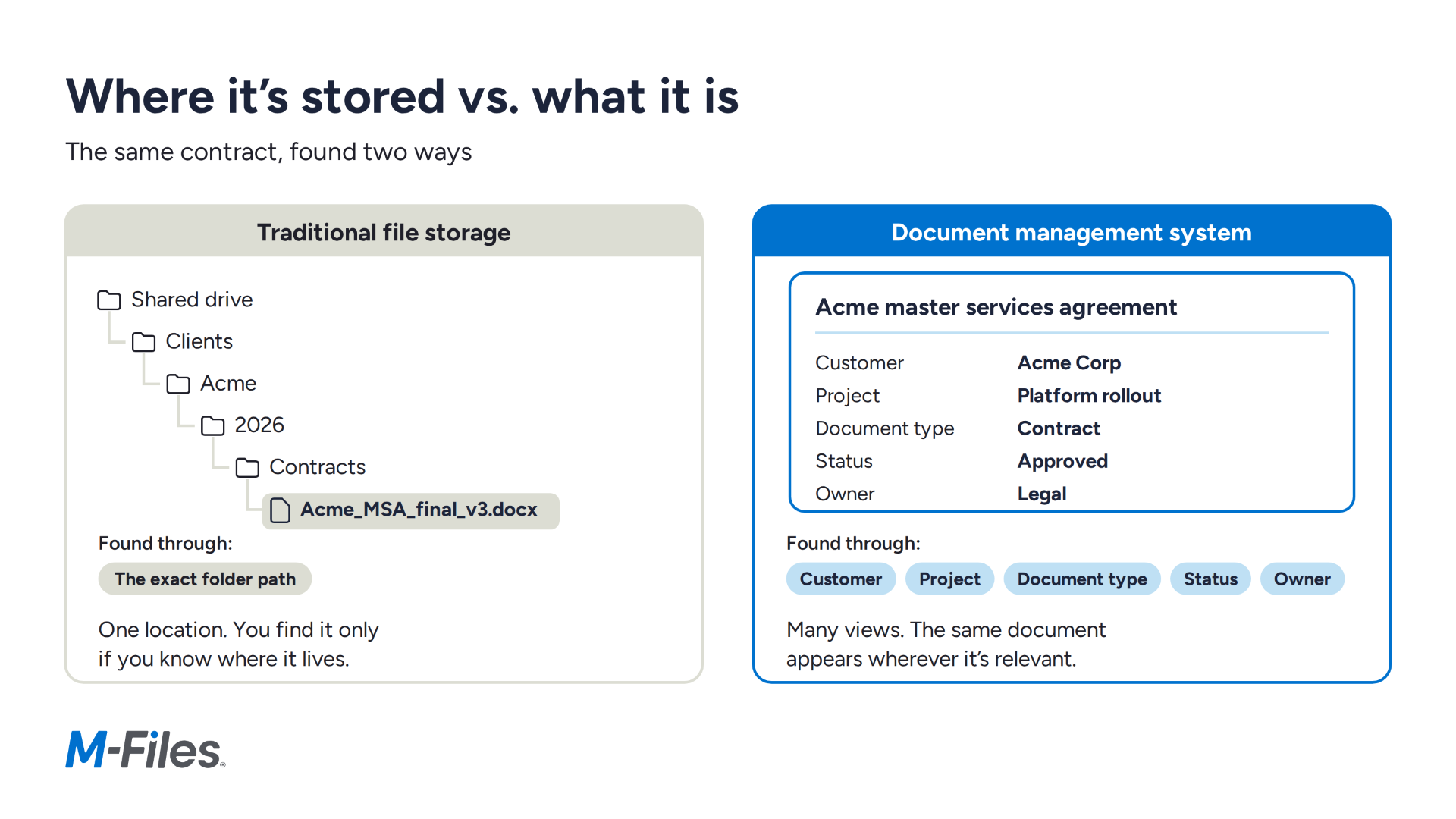
A document management system replaces older storage methods such as filing cabinets, shared network drives, and basic cloud folders. These older tools can store documents but offer limited structure, security, governance, and control.
Instead of simply storing files, a DMS adds the structure, control, and governance that basic file storage lacks, so your teams can manage documents from creation through disposal.
Depending on your organization's needs, a DMS can be deployed on-premises, in the cloud, or in a hybrid environment.
How does a DMS differ from ECM and CMS?
Document management systems (DMS), enterprise content management (ECM), and content management systems (CMS) all help organizations manage information, but they serve different purposes.
| DMS | ECM | CMS | |
|---|---|---|---|
| Primary focus | Business documents | Documents plus other enterprise content, business processes, records, and information governance | Creating and publishing digital content |
| Typical content | Contracts, policies, reports, invoices, and project files | Documents, records, and other enterprise content | Website pages and other digital experiences |
| What it does | Controls how documents are organized, accessed, updated, secured, and governed | Manages content, processes, records, and governance across the organization | Creates, manages, and publishes content |
| How they relate | A core component of an enterprise content management strategy | The broader strategy that includes document management | Serves a different purpose, mainly web and digital experiences |
| How they relate | A core component of an enterprise content management strategy | The broader strategy that includes document management | Serves a different purpose, mainly web and digital experiences |
The lines between these systems can overlap as modern content management platforms combine document management, workflow automation, governance, records management, and other information management capabilities.
What industries benefit most from a document management system?
Organizations across virtually any industry can benefit from a document management system by improving how they organize, secure, find, and govern business information. Organizations with document-intensive processes, regulatory requirements, or complex workflows can see particular value from a DMS.
A few examples include:
- Accounting, tax, and audit: Manage client documents, tax records, financial statements, and audit files while improving collaboration, version control, and compliance.
- Wealth management: Organize client and investment information, control access to sensitive documents, and support regulatory and compliance requirements.
- Management consulting: Keep client deliverables, project documents, and other business information organized and accessible across engagements and teams.
- Engineering and construction: Manage engineering drawings, specifications, contracts, project documentation, and revisions while helping teams work from the right version.
- Manufacturing: Control technical documents, quality records, procedures, product information, and other documentation across manufacturing processes.
- Energy and utilities: Manage operational, engineering, project, and compliance documentation while maintaining greater control over business-critical information.
- Scientific research: Organize research documentation, procedures, reports, and supporting information while improving traceability and information governance.
- Insurance brokers: Manage client, policy, claims, and compliance documents while making information easier for teams to find and securely access.
- Government and public sector: Manage records and public-sector documents with stronger access controls, governance, workflows, and information lifecycle management.
Legal, healthcare, and education organizations also rely on document management to handle contracts, patient records, and student files.
Explore M-Files solutions by industry to see how organizations can apply document management to their specific information, workflow, and governance requirements.
Who uses a DMS?
Different teams across your organization rely on documents to do their work. However, DMS tools are especially helpful for teams that handle a high volume of files or need greater control over how business information is accessed, shared, and governed.
Common examples include:
- Legal teams managing contracts, policies, and other legal documents
- Project teams sharing documents and coordinating information across projects and sites
- HR departments managing employee records, policies, and other sensitive information
- Finance and accounting teams managing invoices, financial documents, approvals, and audits
- Sales and client service teams managing proposals, agreements, and customer documentation
- Operations teams managing procedures, work instructions, and operational records
- Quality and compliance teams controlling policies, procedures, certifications, and audit documentation
- Procurement teams managing vendor documents, contracts, purchase records, and approvals
Why should you use a DMS?
A DMS becomes especially valuable as your volume of documents, users, processes, and governance requirements grow. Shared drives, inboxes, and basic cloud folders may work when information needs are simple, but they become harder to manage as documents spread across teams, systems, and locations.
A DMS gives your organization a consistent way to manage that growing complexity. It connects documents with the people, projects, customers, processes, and policies they relate to while maintaining control over access, versions, workflows, and information lifecycles.
For organizations that depend on documents to run critical business processes, that structure can reduce administrative work, improve productivity, and lower the risks and costs associated with poorly managed information.
How does M-Files help with document management?
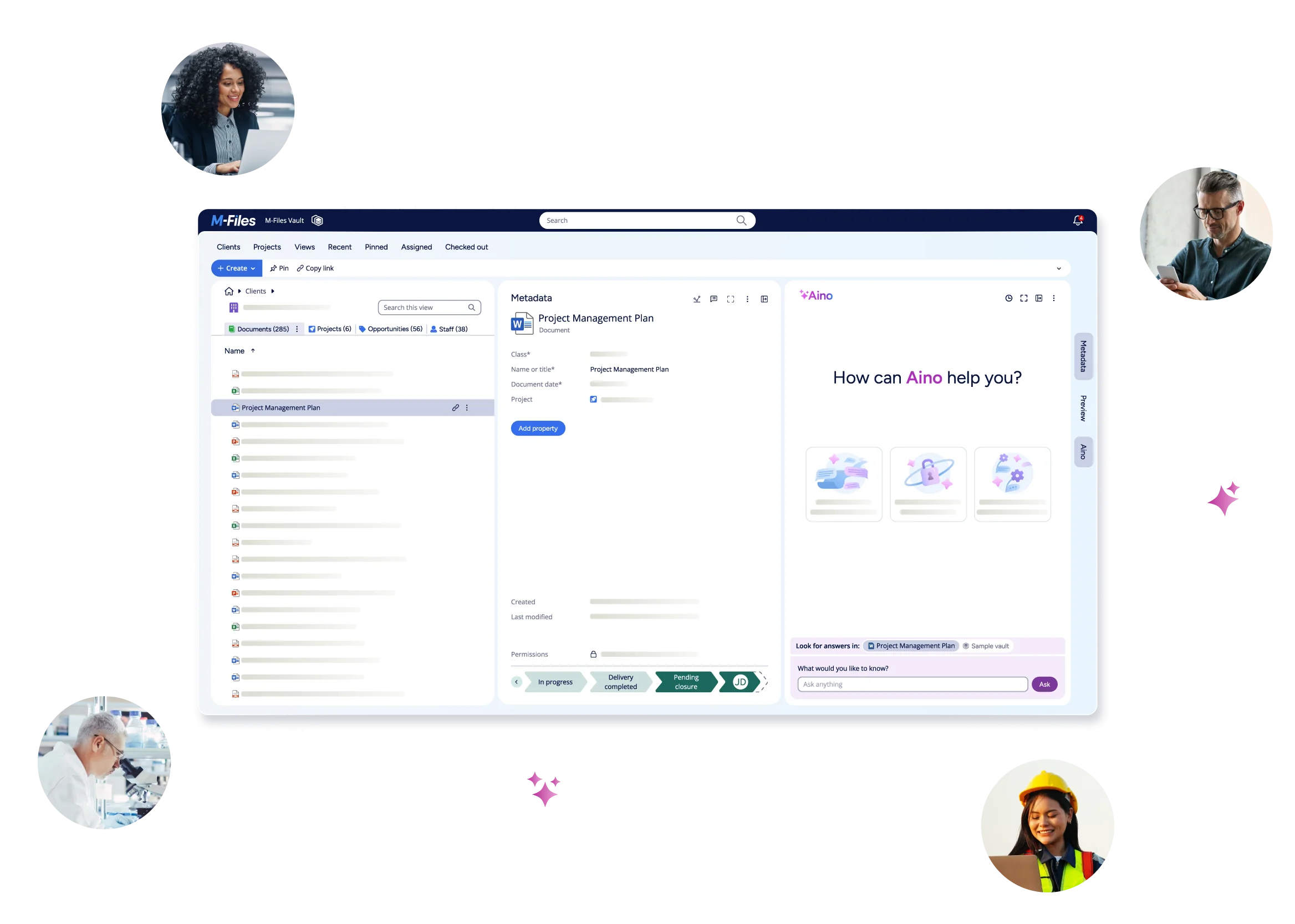
M-Files manages your documents based on what they are and what they relate to, not simply where they are stored. M-Files uses metadata and business context to organize your information by attributes such as customer, project, document type, status, or owner, so your teams can find and work with the right information without navigating complex folder structures.
M-Files controls documents throughout their lifecycle with version control, permissions, automated workflows, collaboration, governance, records management, and retention. It breaks down information silos by connecting documents and their business context across your organization, while maintaining the controls that determine how information is accessed, managed, shared, and governed.
M-Files brings governed business information into the Microsoft tools your teams already use. For M-Files Cloud customers using Microsoft 365 Storage, files are stored in your own Microsoft 365 tenant using Microsoft SharePoint Embedded, an API-only Microsoft storage service. M-Files manages the metadata, business context, permissions, and workflows around them. Your teams can access, manage, and collaborate on documents across Microsoft 365, including Excel, Word, and PowerPoint, Outlook, and Teams, without losing the permissions and governance M-Files applies.
M-Files extends Microsoft security, information protection, and governance to business-critical content. When Microsoft identifies a file as malware, M-Files blocks it from being previewed or downloaded and tells the user why, while scan results and investigation stay in the Microsoft Defender portal. With Microsoft Purview, you can also apply governance and protection policies to content managed in M-Files. For M-Files Cloud customers using Microsoft 365 Storage, these capabilities work within your own Microsoft 365 tenant.
M-Files also integrates with Salesforce, SAP, and Google Workspace. With Salesforce, you can manage documents in the same view as your customer and business data. With SAP, administrators can import data objects such as vendors or products into M-Files, and M-Files can serve as the content repository for document management processes in SAP. With Google Workspace, you can save Gmail messages and attachments to M-Files with one click and convert Google Docs, Sheets, and Slides to PDF records or Microsoft Office formats.
M-Files prepares your business information for AI. By organizing content with metadata and business context and applying permissions and governance, M-Files creates a governed foundation that gives AI systems the reliable information they need to deliver more accurate and relevant results. This helps prepare your content for Microsoft 365 Copilot, AI agents, and other AI experiences while reducing the risks associated with siloed, poorly classified, or overshared information.
Gartner® named M-Files a Leader in the 2026 Magic Quadrant™ for Document Management.
Not sure if your information is ready for AI? Assess your organization's AI readiness to identify gaps in your content, metadata, governance, and AI foundation and get recommended next steps.
Summing up document management system essentials
A document management system does more than store files. It helps your team stay organized, protect information, and work more efficiently throughout the document lifecycle.
With metadata-based search, secure access, version control, governance, and workflow automation, a DMS improves how you manage documents from start to finish. It helps your teams save time, reduce risk, and make business information easier to find, manage, and use. Choosing the right DMS ensures you get the most out of these capabilities.
For a complete overview of document management systems, visit our Ultimate Guide to Document Management Systems.
Latest Articles



Browse Topics
Resources

See M-Files in Action